

Reach members on their phones
WhatsApp loyalty program messages and SMS on your own texts
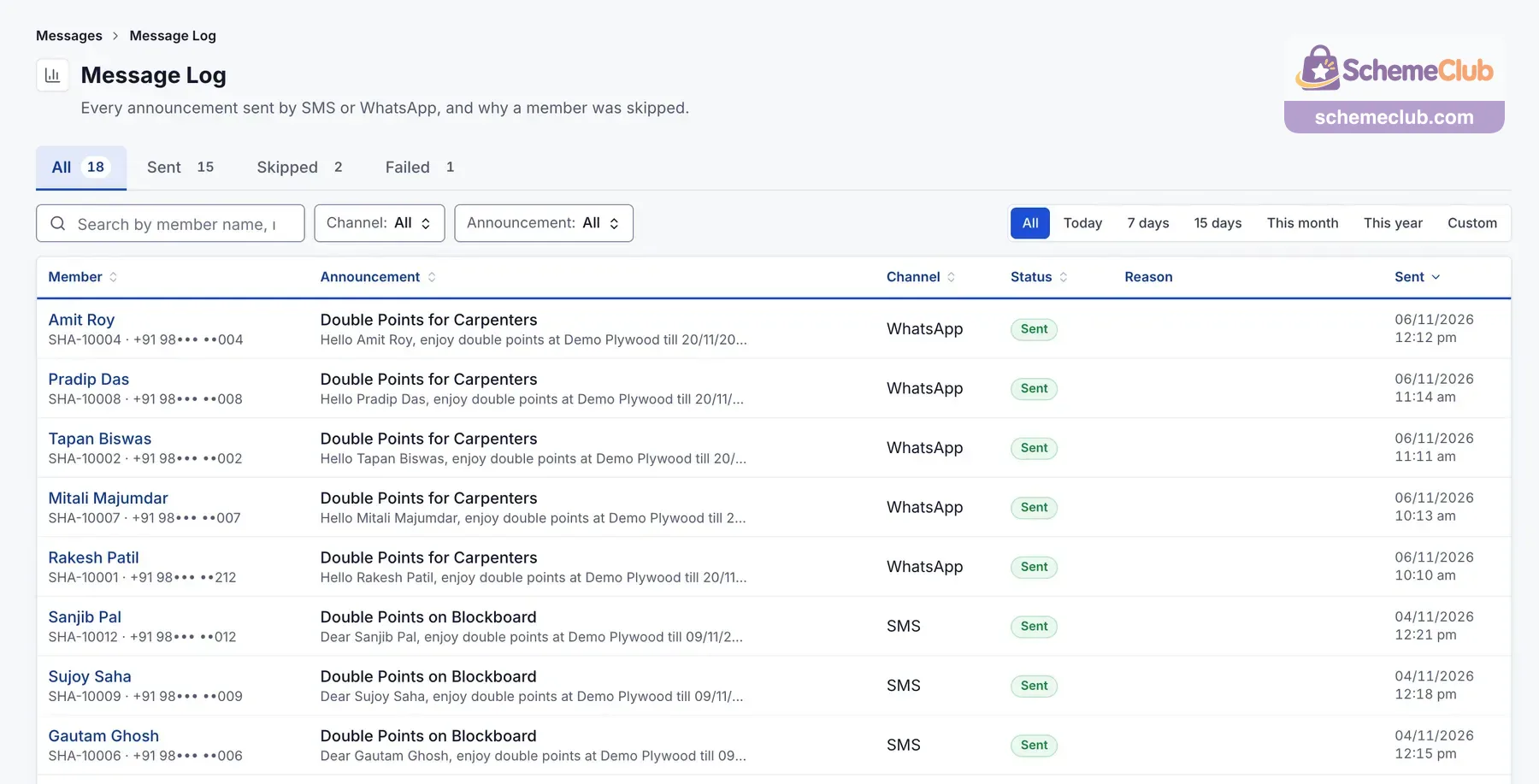
WhatsApp loyalty program messages, one by one
Each announcement sent by SMS or WhatsApp, with its status.
How WhatsApp loyalty program messages work
You start with an announcement, such as a festival offer or a new product. It has a title, a short message, a start date and an end date. You can show it to all members or to some member types. Every SchemeClub program shows running announcements on the member page.
With Messages, an extra feature that we switch on, you can also send a running announcement to members by SMS or WhatsApp.
Set up your SMS details and texts
SMS in India is sent through DLT registration. In SMS Settings, you save your own DLT Entity ID and Sender ID. Your announcement SMS goes out under them.
For both SMS and WhatsApp, you add each text just as it was approved, with its ID or approved name. A text can be in English or Hindi. It can have places that SchemeClub fills in for each member:
- The member's name
- Your business name
- The announcement's title
- The announcement's end date
- The points the member can use
Each filled value is cut to 30 characters. The member gets your approved text with these values, not the full announcement.
Send an announcement on WhatsApp or SMS
Open a running announcement and tap Send.
- Pick the channel: SMS or WhatsApp.
- Pick the text: One of your approved texts for that channel.
- Send: It goes to the active members that the announcement is for.
Then you see how many were sent, skipped and failed. One announcement can go one time on each channel. Your program may have a monthly limit for each channel. If a send would cross the limit, nothing is sent.
Members can switch messages off
On their account page, each member has two switches, one for SMS and one for WhatsApp. Both are on at first. When a member turns one off, SchemeClub skips them on that channel. They can still read the announcement on their member page.
These switches are for announcements. Sign-in codes are not part of them.
The message log
The Message Log has one line for each member that an announcement goes to, on each channel. It shows the announcement, the text as it went, the time and the status. You can search it by member and filter by channel, announcement and date.
Sent means that the message provider took it. It does not show that the member got it or read it. Skipped means the member had turned the channel off. Failed means the provider refused the number.
Features that work with Messages
To add your texts, read the help guide: Message Templates.
SchemeClub works for every trade. See all businesses.
Frequently asked questions
WhatsApp loyalty program: your questions
About sending messages.
It is a message about your loyalty program that a member gets on WhatsApp. In SchemeClub you send announcements this way on your approved texts.
No. Members join by your link or QR code, or your team adds them. They scan on their member page. WhatsApp is only for sending your messages.
No. You send only the texts that you have saved with their approved ID or name.
Yes. A member can turn off SMS, WhatsApp or both for announcements on their account page.
No. The log shows sent, skipped or failed. Sent means the provider took the message.
See an announcement reach the log
In a free demo, we add an announcement, send it and open the message log.
From the blog


